
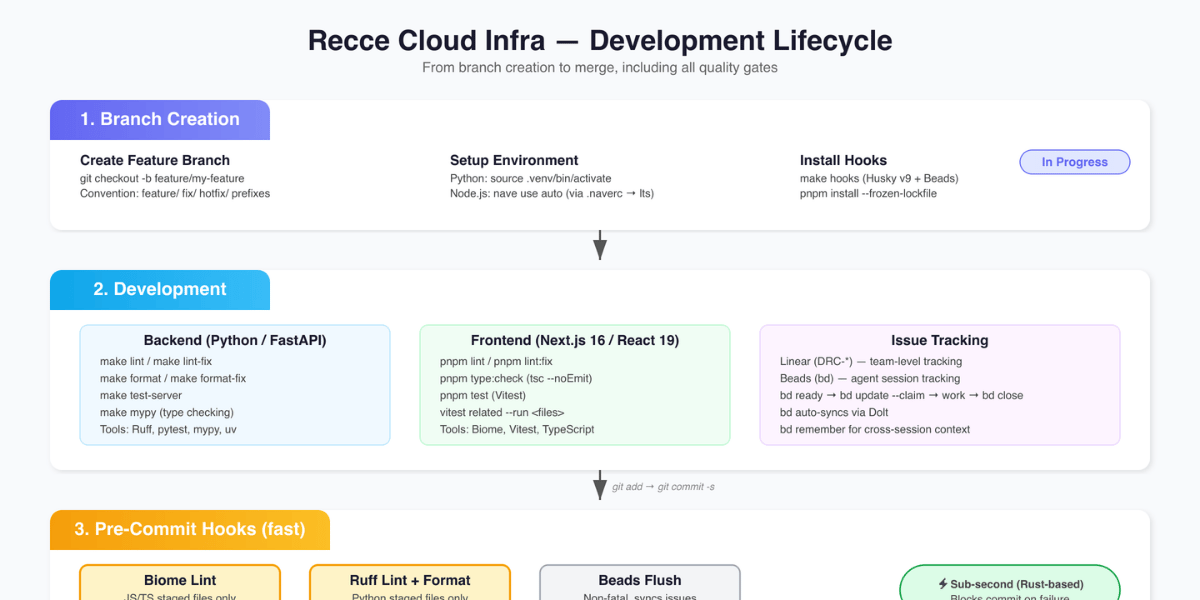

By Jared Scott. In the last post, we covered how agents changed our content and operations workflow. This is the dev workflow story.
We already had a development lifecycle: branch creation, development, issue tracking, pre-commit checks, pre-push checks, and PR review. Every step required a human to drive it. Eight months ago, I wouldn't let an AI agent touch any of it. Today, a single prompt kicks off all six steps. The agent runs them and the human steps in at the gates that matter. Here's how we got there, and the quality gates that made it work.
The Project That Broke Our Token Limits
The project was rebuilding our entire Recce Cloud AWS infrastructure using CDK. API servers, instance launchers, networking, deployment pipelines. Production systems our users depended on.
"Breaking token limits" was literal. Long sessions exhausted Claude's context window. Verbose command output, things like test results and build logs, consumed tokens way faster than I expected. A single git status on a large repo could eat thousands of tokens by itself. I'd regularly hit session limits mid-task and have to restart, losing all the context the agent had built up.
So we put together a token management stack from existing tools and our own custom pieces. RTK is a Rust CLI proxy that strips verbose shell output before it reaches the agent, saving 60-90% on routine operations. Beads is a local issue tracker for coding agents that maintains context without round-tripping to Linear, our issue tracking system. On top of those, we wrote our own skills. Skills are structured prompt templates that keep the agent on-script so it doesn't burn tokens wandering. All of that came directly from hitting walls during this rebuild.
The Adoption Journey
I didn't wake up one morning and hand over my codebase. Each stage built confidence for the next.
August 2025: web interface only. Copy-pasting generated code manually. I wasn't aware of Claude Code, and I was not yet comfortable giving AI direct access to the code base. As a first step I tried Claude Code through the web, blowing through tokens fast, not knowing there was a CLI.
The turning point came after our team offsite. I saw my colleague, Even, using the Claude Code CLI in his terminal. I didn't even know you could do that.
That was a major, major change.
November: serious adoption began. What started as personal experiments became team practice. I learned about skills and how to create and implement them. It all started clicking together. I built "linear-deep-dive" to connect our issue tracker to the dev lifecycle. The agent went from something I asked questions to something that actually ran alongside me through the entire process.
Trust but Verify
Every engineer who adopts AI agents hits the same wall: the code looks good, but how do I know it's good?
Three words: trust but verify.
Treat the agent like a co-worker and do exactly what you'd do on your team. You build gates and guardrails into the process that ensure good code gets written.
Nobody reads every line a junior developer writes. You set up linting, tests, CI, code review. The same approach works for agents, with one difference: agents self-correct when the gates catch errors. A human developer might push back on a linting rule. The agent just fixes it.
I have 3-4 quality gates before deployment. Not because I don't trust the agent, but because I wouldn't trust anyone without those gates. Including myself.
| Gate | What it does | Who runs it |
|---|---|---|
| CLAUDE.md / AGENTS.md | Coding guidelines, architecture constraints, critical do-nots | Agent (reads at session start) |
| Pre-commit hooks | Linting (Biome), formatting, issue sync | Deterministic (milliseconds) |
| Pre-push hooks | Type checks, test suite, security scan | Deterministic |
| PR review | CI pipeline + code review | Agent + Copilot + Human |
Gate 1: Teaching the Agent the Rules
In our repo, instructions are split into CLAUDE.md and AGENTS.md. AGENTS.md has the universal instructions any AI agent needs. CLAUDE.md imports it with @AGENTS.md and adds Claude-specific extensions. That split means Copilot, Cursor, or any other agent can use the same base instructions.
AGENTS.md is explicit about boundaries:
### Do NOT:
- Commit state files (recce_state.json, state.json)
- Edit files in recce/data/ (auto-generated from frontend build)
- Break adapter interface (all adapters must implement ALL BaseAdapter methods)
- Skip pre-commit hooks (never use --no-verify)

### Always:
- Build frontend before backend testing: cd js && pnpm run build
- Test across dbt versions for adapter changes: make test-tox
- Sign off commits: git commit -s
Does the agent follow these 100% of the time? No. That's why the remaining gates exist.
Gate 2: Deterministic Checks That Can't Be Rationalized
When the agent runs git commit, our pre-commit hook fires automatically, running pnpm lint:staged through Biome with strict config.
A taste of our biome.json:
"correctness": {
  "noUndeclaredVariables": "error",
  "noUnusedVariables": "error",
  "useExhaustiveDependencies": "error"
},
"suspicious": {
  "noExplicitAny": "error",
  "noEmptyBlockStatements": "error"
}
Every rule is "error", not "warn". A missing type annotation, an unused variable, an any type. All of those block the commit. The agent sees the error and fixes it. No human needed.
On the Python side, make format (Black + isort), make flake8, and make test run as part of the pre-commit and pre-push flow.
This gate is critical because it's the one the agent can't rationalize away. Claude might decide a test isn't "really needed." Biome doesn't have opinions. It has rules.
The Development Lifecycle: What Changed
Most engineering teams already have a development lifecycle. Ours has six steps, and they all existed before agent adoption. What changed is who does them and how fast.
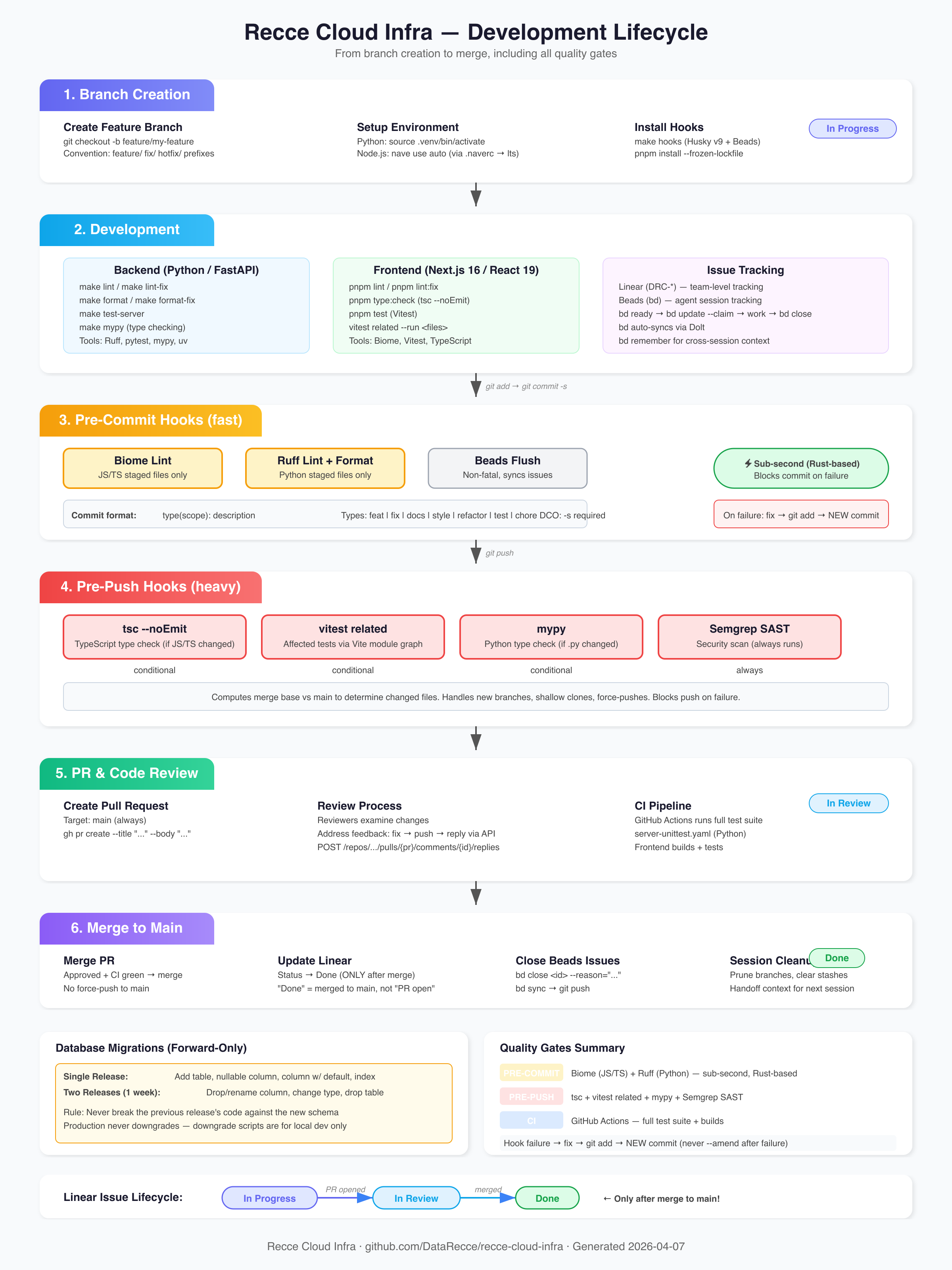
Before agents, this was all manual. Now it's essentially automated. The entry point is a single prompt, e.g. /linear-deep-dive REC-1223, and the agent handles the rest.
The six steps, before and after:
- Branch creation: Agent creates the branch, sets up the env, installs hooks. Before: 15-20 minutes. After: about 2 minutes from a single prompt.
- Development: Agent writes code with continuous linting, formatting, and type checking (Python + TypeScript). Before: manual write-test-fix cycles. After: real-time verification catches issues while writing.
- Issue tracking: Agent syncs with Linear + Beads for local task tracking. Before: manual context-switching between code and tracker.
- Pre-commit: Hooks fire automatically (linting, formatting, Beads sync) in milliseconds. Before: often skipped. After: never skipped, never forgotten.
- Pre-push: Hooks enforce typing (mypy), full test suite, and security scan. This heavier gate only fires when code leaves local.
- PR + review: Agent creates the PR, CI runs, then agent review + human review. Before: 30-45 minutes writing the PR, then waiting. After: same-day for most features.
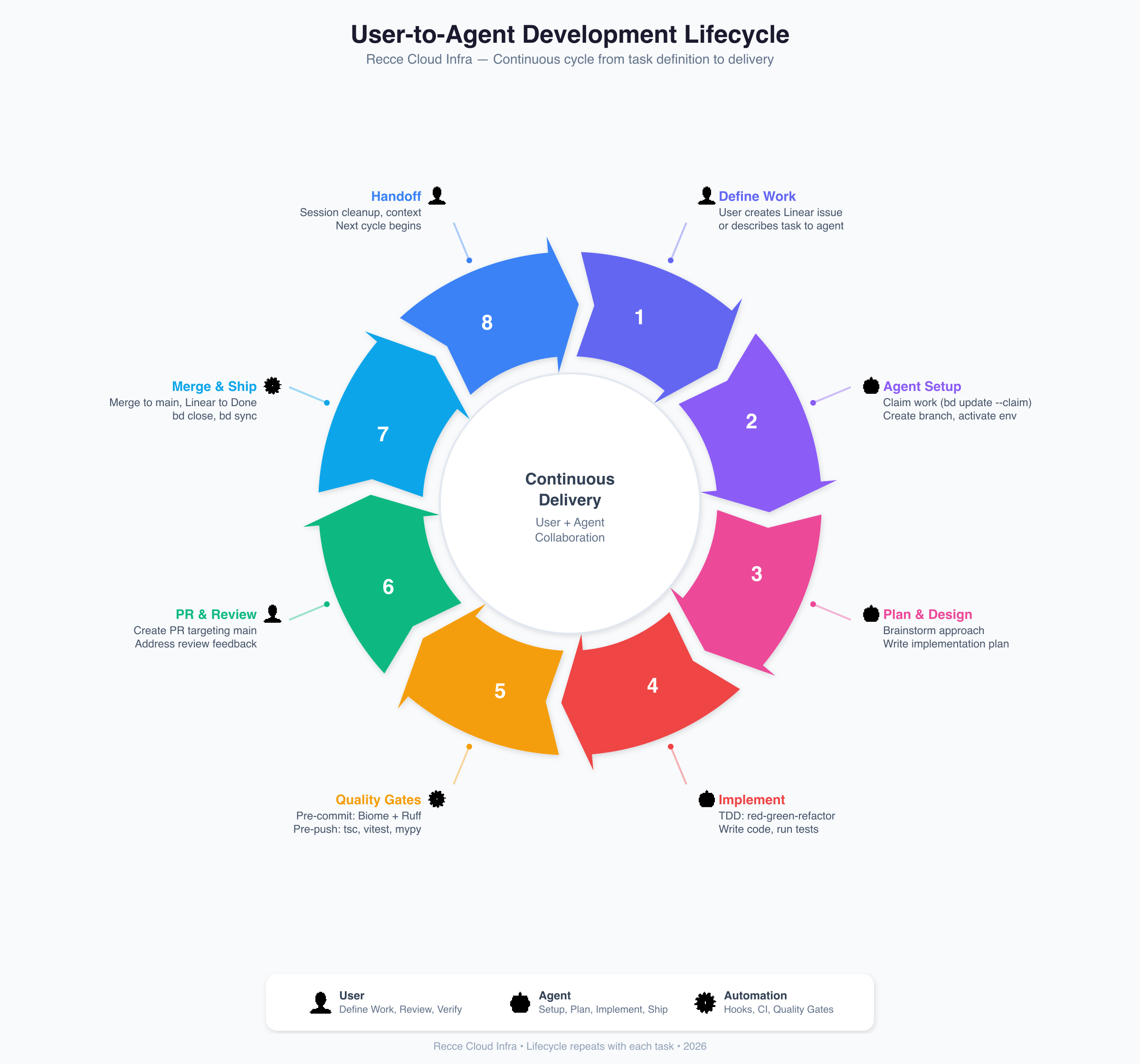
Steps marked with a person icon require human involvement. Robot icon: agent-driven. Gear icon: fully automated.
The Axios-to-Fetch migration is a good example of the scale. 46 files, ~1,800 lines changed. Before agents, that's a solid week of work. The agent completed it in a day and a half, broken into 17 small commits, each individually testable. I was reviewing as it went instead of writing.
Why Human Review Still Matters
The entire flow can run with minimal human intervention. But I keep humans in the loop at PR review. Here's why.
Claude is very optimistic when it reviews code. It focuses more on whether the code tells a coherent story than on whether it actually handles edge cases.
The Cloud Share feature is a good example. Claude wrote it. All tests passed, linting clean, types correct. Claude reviewed its own PR and found 8 issues. Copilot found 5 more. I fixed all 13, everything was green.
Then I did an "antagonistic review," where I specifically told Claude to try to break its own code. That round found str(None) evaluating to the string "None" instead of failing a guard clause, Number.isNaN not catching Infinity on port numbers, and validation logic silently dropping invalid fields instead of telling the user.
None of those showed up in automated checks. The types were correct. The tests passed. The linting was clean. But a human thinking "what happens if the Cloud API returns null for an ID?" catches that str(None) becomes a valid-looking string. That's the kind of thing you only find when someone is actively trying to break it, not just verifying the happy path.
Each layer catches different things. Automated checks catch correctness issues. Agent review catches coherence issues. And human review is where you ask "what happens when things go wrong in ways nobody thought to test?"
Claude vs. Copilot: The Review Gap
I use Copilot as a second reviewer alongside Claude. It catches problems Claude consistently misses.
Claude accumulates context throughout a session. The longer you work with it, the more it builds rationalizations. If your review skill has six required steps, Claude might decide step four is a suggestion. Even if you specifically say it's required, it'll find ways around it. In fact, Anthropic's own Labs team has documented the same behavior in this blog post from late March, 2026.
Copilot runs fresh every time. No accumulated context, no rationalization, no shortcuts.
The Specificity Paradox. The more specific your review instructions, the more Claude may ignore them. A dense skill file gives Claude more surface area to selectively interpret which requirements are "really" required.
Copilot reads project-specific instructions from .github/copilot-instructions.md: things like architecture, exact build commands, common pitfalls. It focuses on the mechanical correctness that Claude overlooks.
In practice, the solution is a three-layer review:
- Claude: development and initial review
- Copilot: mechanical correctness
- Human: what happens when things go wrong
Metrics: The Before and After
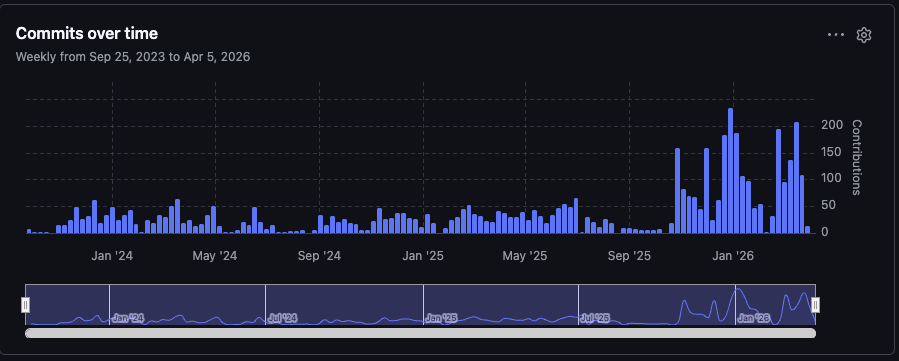
Before November 2025, weekly commits hovered around 20-50. After adoption, 100-200+ per week consistently. The increase isn't just more work getting done. Agents commit differently. Small, self-contained changes instead of large batches. A feature you'd normally ship in 2-3 commits becomes 17. That means each commit is easier to review, test in isolation, and bisect when something breaks.
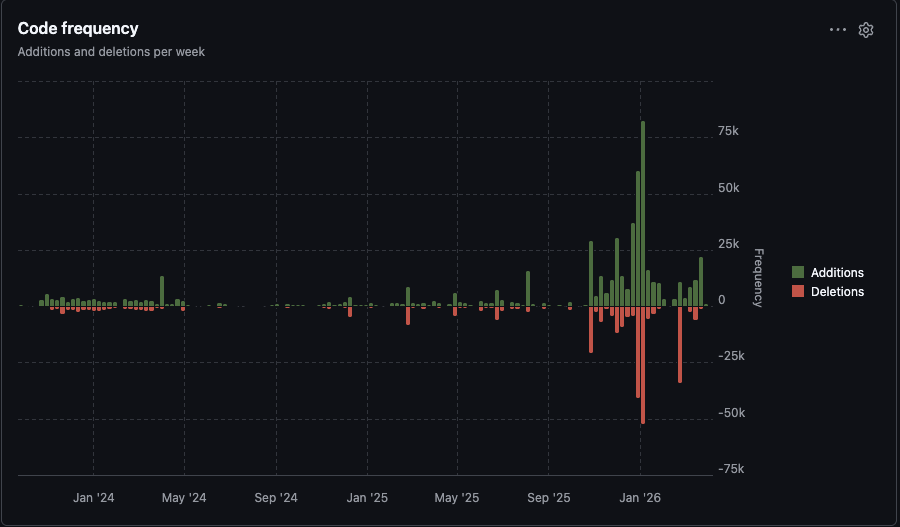
The deletion spikes are refactoring passes. The agent doesn't just add code. It restructures and cleans up as part of the workflow.
What We'd Do Differently
The biggest lesson was doing things in the wrong order. I gave the agent production infrastructure work before we had quality gates in place. No pre-commit hooks, no strict linting config, no structured skills. The agent wrote code, it shipped, and it worked. But when we went back later to add tests and linting, we found problems we should have caught up front. You can see it in the git history. There's a stretch of commits that are just "fix test," "fix unittest," "increase testing coverage from 72% to 77%." That was us paying down debt from moving too fast.
The other surprise was how much session length matters. Early on I ran really long sessions thinking more context was better. The opposite was true. The longer the session, the more the agent cut corners. It would skip required steps, rationalize that checks weren't necessary. I didn't understand at first why the quality was inconsistent. It wasn't a model problem. It was a session length problem. Once I started breaking work into shorter, focused sessions, the consistency went way up.
The third surprise was token cost. I was using Claude through the web interface early on, copy-pasting code back and forth. I didn't realize how fast that burns through tokens. When I moved to the CLI it got better, but verbose command output was still eating context. A full git diff or a test suite dumping hundreds of lines adds up quick. That's what led us to adopt RTK and design workflows that keep the context window clean.
If I started over today:
- Quality gates first. Before writing a single line of production code.
- Skills from day one. Custom skills prevent the agent from going off-script. They're not a nice-to-have.
- Short sessions. Break work into focused chunks. Don't let context accumulate.
- Token management upfront. Use tools like RTK and Beads to keep the context window clean.
- Portable instructions. Our
AGENTS.md/CLAUDE.mdsplit happened because agent instructions shouldn't be locked to one LLM. One source of truth for any tool.
What's Next
We're still iterating. The gap between Claude and Copilot reviews bothers me. I think deterministic checks can cover more of what Copilot catches. We're also exploring Copilot at the team level to automate the secondary review step.
How do you ensure code quality when agents write most of the code? What does your review process look like? Reach out to us at community@reccehq.com. We're collecting approaches and will share what we learn.
FAQ
How do I make AI agents follow coding standards?
Split instructions into an AGENTS.md (universal rules any agent reads) and an LLM-specific file (e.g., CLAUDE.md). Then back it up with deterministic pre-commit hooks. The agent follows the instructions most of the time, and the hooks catch the rest.
What quality gates work with Claude Code?
Recce Developers use four layers: instruction files (CLAUDE.md/AGENTS.md), pre-commit hooks (Biome linting, formatting), pre-push hooks (type checks, tests, security scan), and PR review (Claude + Copilot + human). The key thing is that gates 2 and 3 must be deterministic, not AI-powered.
How is Copilot different from Claude for code review?
Claude accumulates context and can rationalize skipping steps. Copilot runs stateless each time with no memory and no shortcuts. Claude reviews narrative coherence. Copilot catches mechanical issues. We use both.
How do I prevent AI agents from burning through context windows?
Use a CLI proxy like RTK to strip verbose output (saves 60-90%), keep issue tracking local with tools like Beads, and break work into short focused sessions. Long sessions degrade quality.
Try Automated Data Validation For Yourself
Try our Data Review Agent on your data projects, sign up for Recce Cloud and tell us what works and what breaks.
Here are docs that help, we're more than happy to help you directly, too.
We'd love to hear from you. If you can spare 30 minutes to chat, we'll send you a $25 gift card as a thank you. Join the feedback panel.