
Data validation
Agentic data workflows
The Validation Gap in dbt MCP Workflows

Dori Wilson
Forty percent of records disappeared because a JOIN condition silently filtered them out. dbt build passed. Tests passed. The SQL compiled. Everything a build tool could verify checked out — and none of it caught the problem.
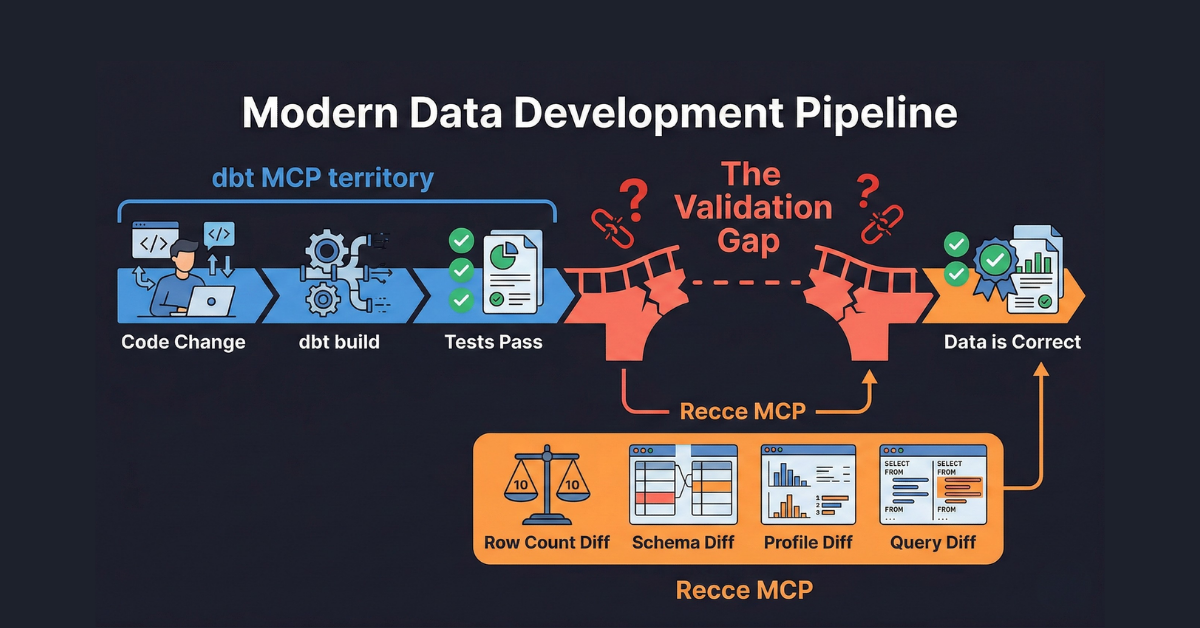
This is the gap between "it builds" and "it's correct," and every data team running dbt Model Context Protocol (MCP) hits it eventually. Not because dbt MCP is limited. Because validation is a different job than building.
dbt MCP Is a Build Engine. That's the Point.
dbt MCP is excellent at what it does. Ten tools cover the core development loop:
build,run,test: execute models and run data tests in DAG ordercompile,parse: debug Jinja, validate syntaxshow: preview query resultsget_lineage_dev: trace upstream and downstream dependenciesget_node_details_dev: inspect model metadata, columns, and configs
Additional tools are available with configuration: generate_model_yaml and generate_staging_model for scaffolding, execute_sql and text_to_sql for direct SQL execution.
That is a complete development toolkit. Build, test, inspect, iterate. For creating new models or debugging SQL, nothing else is needed.
The gap appears when the work shifts from building to validating. Specifically, when a data developer needs to answer: "How does this branch's output compare to production?"
dbt MCP talks to one environment at a time. It connects to a dev schema or a prod schema, not both at once. Comparing what a branch produces against what is already in production requires stepping outside the tool's design.
Two Tools, Different Jobs
The distinction between building and validating shows up in everyday development tasks. When an AI agent has both dbt MCP and Recce MCP available, the task determines which server it reaches for.
For discovery and development work, dbt MCP is the right tool and the simpler path. Previewing model output (show), tracing DAG dependencies (get_lineage_dev), inspecting column metadata (get_node_details_dev), scaffolding schema YAML (generate_model_yaml) — these are build-time concerns that operate within a single environment. Recce MCP has overlapping surface area in some cases (it can query data, it can show lineage), but its tools are designed to compare, not to explore. An agent with both servers available reaches for dbt MCP here without hesitation.
The handoff happens when the task shifts from building to validating.
"Compare row counts for fct_repos_daily and fct_users_daily against production."
The agent uses Recce MCP's row_count_diff. No amount of dbt show calls replaces a tool that queries both environments at once and returns base and current counts side by side.
"Did my refactor change any column types?"
The agent uses Recce MCP's schema_diff. dbt MCP's get_node_details_dev can show current columns, but it cannot compare them against the production schema. Schema Diff returns every column addition, removal, and type change across all modified models in a single call. A refactor that accidentally widens a DECIMAL column or drops a NOT NULL constraint surfaces immediately.
"Show me the impact radius of this change."
The agent uses Recce MCP's lineage_diff. dbt MCP's get_lineage_dev shows the static DAG — the same graph regardless of what changed. Recce's Lineage Diff annotates each node with a change status (added, removed, modified) and flags downstream models as impacted. One is a map. The other is a map with the change marked on it.
"Run our standard validation suite."
The agent uses Recce MCP's run_check to execute preset checks defined in recce.yml. dbt MCP has no equivalent to this kind of reusable, declarative validation suite. dbt tests check whether data meets predefined constraints. Preset checks compare data between environments — a fundamentally different question. Without them, validation coverage depends on what someone remembers to run. That coverage erodes over time as ad-hoc queries drift across PRs and Slack threads.
dbt MCP handles everything up to "does this model work?" Recce MCP takes over at "does this model produce the right data?"
The DIY Tax
Any analytics engineer can write a comparison query. The problem is not difficulty. The problem is that the queries are slightly different every time. They live in different places: PR comments, Slack threads, personal notebooks. No one inherits them when a new team member joins. One forgotten check is one silent regression.
Here is what replicating Recce's core validations looks like with dbt MCP only.
Row Count Diff
Two queries. Two target switches. Manual comparison.
-- Run on dev
SELECT 'dim_users' as model, COUNT(*) as rows
FROM dev_schema.dim_users
UNION ALL
SELECT 'fct_users_daily', COUNT(*)
FROM dev_schema.fct_users_daily;

-- Switch to --target prod, run again
SELECT 'dim_users' as model, COUNT(*) as rows
FROM prod_schema.dim_users
UNION ALL
SELECT 'fct_users_daily', COUNT(*)
FROM prod_schema.fct_users_daily;

-- Now eyeball the difference between two result sets.
With Recce MCP, this is one call: row_count_diff with a model selector. Both counts returned side by side.
For two models, the manual approach is manageable. For every modified model in a PR, it becomes a chore nobody does consistently.
Profile Diff
Profile comparisons are worse. The aggregation SQL grows per column, per model, and the UNION ALL pattern repeats for every environment. Recce MCP's profile_diff returns min, max, average, median, distinct count, and null proportion for every column in both environments with a single call.
Query Diff with Primary Key Matching
This is the most tedious to replicate manually. Comparing two result sets row by row, matched on primary keys, surfacing which rows were added, removed, or changed:
- Run the same query on both schemas
- JOIN on primary keys
- Compare every column for differences
- Surface additions, removals, and changes
The JOIN logic varies by model. The comparison SQL gets long. Most teams skip this entirely.
With Recce MCP: query_diff(sql_template="SELECT ...", primary_keys=["user_id"]). The tool handles both queries, the join, and the diff automatically.
The Real Cost
| Factor | DIY with dbt show | Recce MCP |
|---|---|---|
| Queries to write | 2 per comparison (base + current) | 1 call |
| Target switching | Manual or schema hardcoding | Automatic |
| Output format | Raw rows, manually compared | Structured diff with base and current values |
| Primary key matching | Custom JOIN logic per model | Built-in parameter |
| Repeatability | Save queries somewhere, remember to run them | Preset checks in YAML, defined once and run on every PR. Requires upfront investment in defining what to check. |
| Coverage | Whatever someone remembers to check | Systematic for defined checks: schema + row counts + profiles. Coverage is only as good as the preset definitions. |
Recce MCP: The Validation Layer
Recce MCP exists to do one thing dbt MCP cannot: compare two environments at once.
It reads two sets of dbt artifacts: target/manifest.json and target/catalog.json for the current branch, and target-base/manifest.json and target-base/catalog.json for production. Every tool operates across both, returning structured diffs rather than raw query results.
Eight tools cover the validation surface:
Environment comparison (the core):
row_count_diff: Row counts for base vs. current, side by sideprofile_diff: Statistical profiles (min, max, avg, median, distinct count, null proportion) for every column, both environments, one callquery_diff: Execute SQL on both environments and compare results row by row, with primary key matchingschema_diff: Column-level changes: added, removed, type-changed columns across all modified models
Change-aware lineage:
lineage_diff: The DAG with annotations showing which models changed, which are downstream-impacted, and the Impact Radius of a modification
Preset checks:
list_checksandrun_check: Execute validation suites defined in YAML. Define checks once, run them on every PR. The first PR requires defining what to check. Every subsequent PR runs those checks automatically.
Flexible querying:
query: Execute SQL with Jinja support against either environment
Where dbt MCP asks "does this model build correctly?", Recce MCP asks "does this model produce the right data compared to what is already in production?"
Both Servers, One Config
dbt MCP and Recce MCP run side by side in a single .mcp.json file:
{
  "mcpServers": {
    "dbt": {
      "type": "stdio",
      "command": "uvx",
      "args": ["dbt-mcp"],
      "env": {
        "DBT_PROJECT_DIR": "/path/to/project",
        "DBT_PATH": "/path/to/dbt"
      }
    },
    "recce": {
      "type": "stdio",
      "command": "recce",
      "args": ["mcp-server"]
    }
  }
}
Both servers are available to any MCP-compatible AI agent. No integration work beyond the config.
One prerequisite: Recce MCP reads production artifacts from a target-base/ directory alongside the current branch's target/ artifacts. In CI, a workflow step typically builds main and stores its artifacts there. Locally, the setup is: check out main, run dbt docs generate --target prod, and copy the results to target-base/. Lineage Diff and Schema Diff work from manifests alone. The data-comparison tools (Row Count Diff, Profile Diff, Query Diff) need both environments fully configured. This is the highest-friction step in the setup. Recce Cloud handles artifact management automatically for teams using CI integration.
MCP-based development workflows are still emerging. Not every data team is using AI agents to orchestrate dbt builds today. But the Model Context Protocol is how tools expose capabilities to agents, and as agent-assisted development becomes standard, the validation gap becomes harder to ignore. The configuration is minimal. The real investment is in defining which checks matter for a given project, and that investment pays forward on every subsequent PR.
Build and Validate
dbt tests check correctness against rules: not-null constraints, unique keys, accepted values. Row Count Diff, Profile Diff, and Query Diff check correctness against reality: did the data change the way it was supposed to?
The development loop has always had two halves. dbt MCP handles the build. Recce MCP handles the validation. Both servers, one config.
Try Automated Data Validation For Yourself
Try our Data Review Agent on your data projects, sign up for Recce Cloud and tell us what works and what breaks.
Here are docs that help, we're more than happy to help you directly, too.
We'd love to hear from you. If you can spare 30 minutes to chat, we'll send you a $25 gift card as a thank you. 💬 Join the feedback panel.