

This is part 4 of our Building Recce Cloud series: Part 1: The Adoption Problem | Part 2: Eliminating the Setup Barrier | Part 3: Guided Data Review | Part 4: AI Data Reviews
Code changes have AI review tools. Data changes don't... until now. Here's how we went from a single prompt to an AI agent that performs the first pass on data validation in every PR.
Why AI Summary for Data Reviews
In our previous blog, we talked about why data teams need need AI Summary. Code changes can be reviewed by AI tools, but there hasn't been an equivalent for helping them validate the impacts on their data. In this blog we talk about how we went from a single prompt to an AI agent.
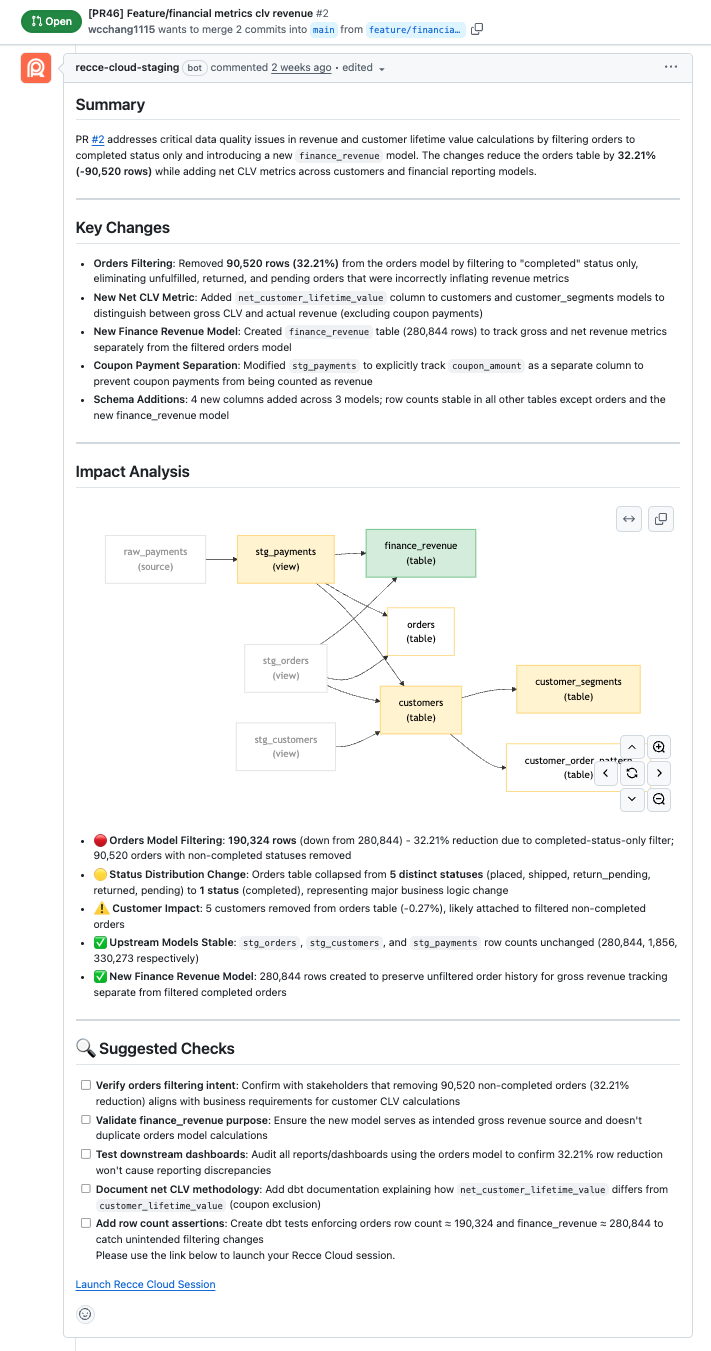
We launched AI Data Reviews this week. It performs the first pass on data validations when you open a pull request (PR) or merge request (MR) and includes:
- A high-level summary of the PR from a data perspective
- Key Changes that highlight the most impacted metrics and the root causes.
- Visual lineage diff helping teams see downstream impacts
- Calling out red, yellow, and green risk factors on data directly modified and downstream of code changes
- Suggested follow-up tests for complete data validation
The AI Data Review example:
First Approach: The Single Prompt
We thought it would be best to start simple: gather all context of a code change, write one prompt, see the output, and iterate until it looked "good."
We used Anthropic's API and fed the following into one large prompt:
- PR details and code diff
- Lineage changes from Recce
- Row counts and schema diffs
The output on the first PR looked good! It summarized the changes, highlighted impacts, and suggested follow-ups. The first PR was simple, so we tested it on more internal PRs. Then we noticed it wasn’t quite ready:
- The summary format was not as our requested every time
- The output missed some information randomly
- The responses not followed our prompt carefully
As we debugged, we found it’s easy to hit prompt limits, so the model lost information each time it ran. When we crammed everything, PR context, diffs, Recce results, into one API call, the prompt size grew too large. Information got cut off or the model couldn’t process it all properly.
After our dogfooding, we realized it needed to explore the context independently. We’d review the output and think “why didn’t it check the row count for model X?” Then realize: because we didn’t include it in the prompt. The LLM couldn’t go get data on its own, it only worked with what we pre-selected.
We needed something more intelligent: an agent that could explore data and make decisions autonomously.
Moving to an Agent Architecture with Claude Code CLI
We needed something that could explore data and pursue the review workflow on its own: an AI agent.
With an agent architecture, the LLM can call tools during its reasoning:
- Check the lineage diff → notice model X changed
- Follow the lineage → check downstream impacts
- Perform row counts for model X → see a 50% drop
- Investigate why → check code diff, schema changes, write custom queries
The agent explores like a human reviewer would: discover something → dig deeper → follow the trail.
Here is our first agent architecture:
- Wrap Recce as an MCP tool, giving the agent access to lineage diffs, row counts, query results, and schema changes.
- Use
ghCLI calls to pull PR context, code diffs, and metadata. - Let the agent decide which tools to call and when.
This immediately improved results.
Then, as we dogfooded it on the more complex internal PRs, new problems kept showing up. Each PR revealed different cases:
- The agent forgot about things, results became unreliable
- Lineage graphs sometimes inaccurate
- Results used out of date info from older PR comments
The Token Limit Wall
We hypothesized that the Agent forgetting things worked similarly to our earlier issue with prompt limits. As we dive in, we realized three limits in Claude:
- Model context window: Claude Haiku supports up to 200k tokens.
- Single prompt limit: About 90k tokens form our experience.
- MCP tool response limit: 25k tokens per tool call. Exceed this and the response fails.
We hit the MCP tool limit almost immediately. Our first lineage diff output returned the full API payload: every node detail, all dependencies, complete diff information. For a PR with only 5 models changed, this easily exceeded 25k tokens. The tool call failed and would be worthless at scale.
PR context fetching wasn’t much better. The agent needed to make 5-10 back-and-forth calls to gh CLI to gather all the context: PR details, code diffs, comments, metadata. Each round-trip added latency and burned through tokens.
We had to rethink how we designed our architecture.
To solve theses problems we went through an iterative process tackling each one separate. Here are a few examples:
Solving Limits by Subagents
With a single agent, we hit both the context window limit and single prompt limit. It starts forgetting earlier information. We needed a way to distribute the context load.
Anthropic provides an elegant mechanism: subagents. Each subagent is a specialist with its own 200k context window, working under a main coordinating agent.
So we created two subagents to work with the main one:
- Main agent:
- Orchestrates the overall job
- Receives summaries from subagents, not full details
pr-analyzersubagent:- Extracts and interpret PR context
- Returns a summary to main agent
recce-analyzersubagent:- Explores data with Recce tools
- Returns findings to main agent
The workflow:
- Main agent identifies the PR
- Delegates PR understanding to
pr-analyzer - Delegates data exploration to
recce-analyzer - Aggregates results and generates the final summary
The main agent doesn’t need the full exploration details, just the summaries. By delegating deep analysis to specialists, we effectively tripled our context capacity.
Optimizing MCP Response Limit
To stay under the 25k limit of MCP tool, we introduced several optimizations:
- Return only changed + downstream nodes In a large dbt project, most models are unchanged upstream dependencies. For a PR with 5 changed models in a 200-model project, we keep those 5 plus their downstream impacts and filter out the other ~150 unchanged upstream models.
- Use dataframes instead of key-value objects Key-value entries repeat keys for every record, wasting tokens. Dataframes reduce duplication dramatically.
- Use numeric indices instead of long node IDs Replacing IDs like
model.my_project.customer_orderswith compact integers (1, 2, 3…) substantially reduced token counts.
These optimizations made the tools usable within Claude’s 25k constraint.
Fetching PR Context
The agent needed 5-10 back-and-forth gh CLI calls to gather PR context: details, code diffs, comments, metadata. Each call burned tokens and added latency. Worse, partial context across multiple calls sometimes caused the agent to miss information or lose track of what it had already fetched.
We wrapped PR fetching logic into one custom MCP tool using a single GitHub GraphQL call. This:
- Reduced agent round-trips from around 5–10 to one
- Ensured complete PR context in a single response
- Made summary generation faster, cheaper and more reliable
As a bonus, it shortened our development iteration cycles. We could test the agent on different PRs and see results in seconds instead of waiting through multiple calls to fetch PR context.
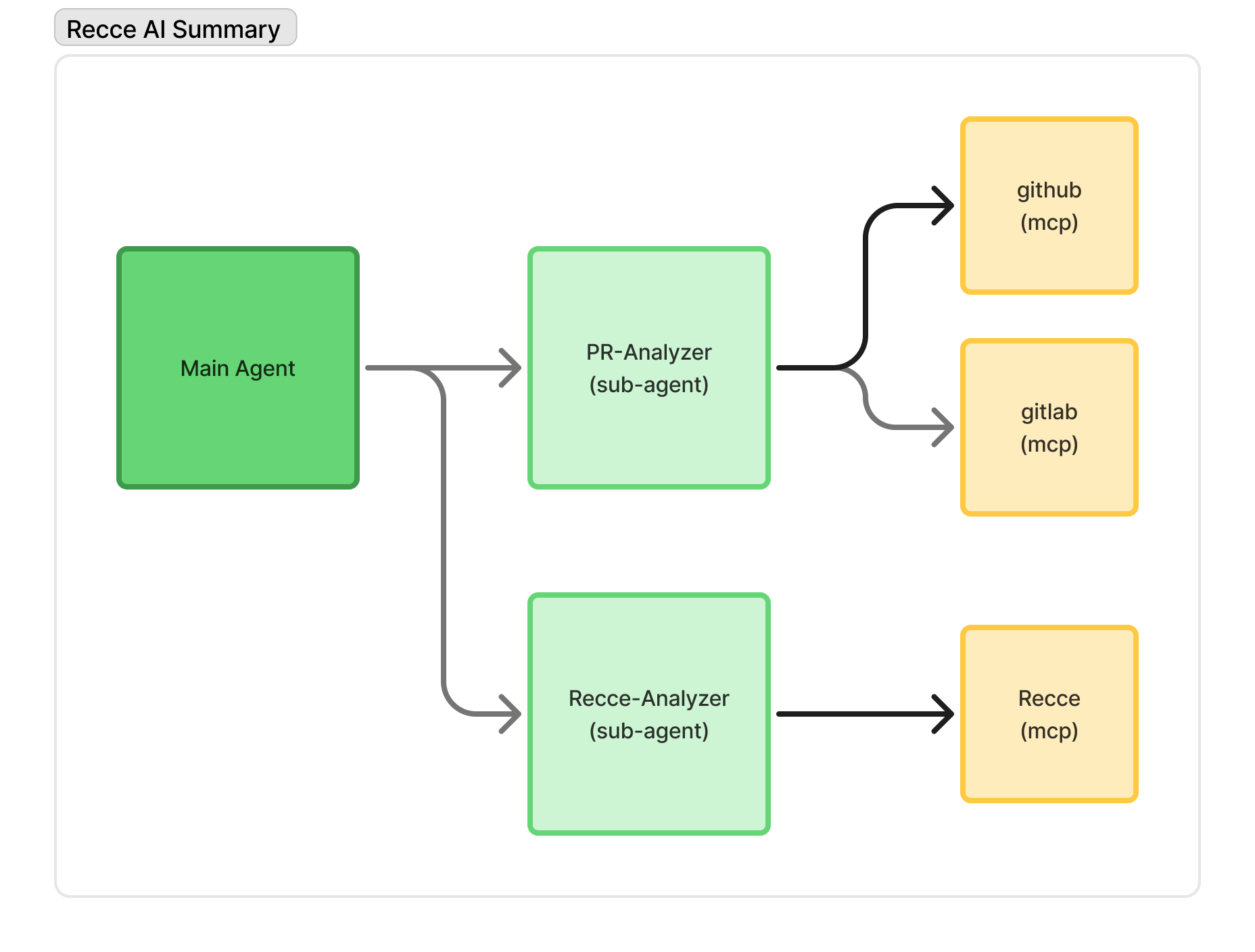
Agent architecture of Recce AI Summary
Resolving Lineage Graph Issue
We found the generated lineage graphs were sometimes incorrect, showing incorrect connections between models in complex cases.
Initially, our response format followed the original dbt manifest.json structure, for example:
{
   "nodes": {
      "columns": ["id", ...],
      "data": {
        ["node_1", ....],
        ["node_2", ....],
      }
   },
   "parent_map": {
      "node_1": ["node_2", "node_3"],
      "node_4": ["node_2"]
   }
}
As the graph grew larger, the agent would occasionally produce more and more incorrect connections. Through several iterations, we observed that the model needed to reason very carefully over the parent_map to generate a correct graph, and this representation made that reasoning difficult.
We needed a format that was easier for the agent to work with. Since our AI Summary renders the impact radius on lineage as a Mermaid diagram, we changed the tool output to match Mermaid’s native edge representation:
{
   "nodes": {
      "columns": ["id", ...],
      "data": {
        ["node_1", ....],
        ["node_2", ....],
      }
   },
   "edges": {
			"columns": ["from", "to"],
      "data": {
        ["node_2", "node_1"],
        ["node_1", "node_1"],
      }
   }
}
With this change, the agent no longer needs to infer relationships from a nested mapping. As a result, the generated Mermaid diagrams are significantly more stable and accurate.
Fixing PR Comment Pollution Issue
We wanted the AI Summary to appear as a single PR comment that updates itself when new commits arrive. While testing on our internal PRs, we found the agent ignored new instructions and misinterpreted old context.
The root cause: the agent was consuming its own previous summary outputs as part of the PR context. When it read all PR comments to understand the discussion, it treated its old summaries as new information. This caused two problems:
- It failed to follow updated prompts, thinking the old summary was the correct format.
- It mistook old analysis as current context.
We then filtered out agent-generated comments by their signature before feeding the PR context to the agent. This ensured the agent followed new instructions correctly and interpreted the current PR context without confusion from old summaries.
Moving to Claude Agent SDK
With these issues resolved, we faced a new challenge: scaling our agent infrastructure.
Claude Code’s CLI was a great starting point. It supports headless execution and agent loops. But we know there are more edge cases waiting to be discovered, both from our continued dogfooding and when users adopt it with their own PRs.
Our requirements would grow and the maintainability would become difficult. We foresaw upcoming needs:
- Support not just GitHub but also GitLab and maybe other git platforms
- Explore different contexts and understand their impact on AI summary quality
- Accommodate early users feedback for different summary formats: short high-level or long with details
Beyond features, we knew that as the architecture became more flexible, the behavior also became less predictable. Balancing simplicity and flexibility remains an ongoing challenge.
Right at this time, Claude Agent SDK was released. It provides programmatic control and better structure for complex agent workflows. We migrated to it immediately, and it gave us the foundation to handle the expanding complexity while maintaining code quality.
What We Learned and Where We Are Now
Building this took us two months of iteration, not days. We went through:
- Single prompt with API calls
- Agent architecture with Claude CLI
- Custom MCP tools and subagents for token limits
- Migration to Agent SDK for infrastructure
And at each stage, dogfooding on real increasingly complex PRs revealed new edge cases we hadn’t anticipated.
You may have thought: “I’ll just give a prompt to ChatGPT and get PR summaries in a weekend.”
The reality: we spent weeks discovering why that doesn’t work.
Domain-specific agents require deep iteration on token limits, context management, tool design, output formats, and countless edge cases discovered only through real usage. What looks like a simple prompt problem is actually an infrastructure and observability challenge.
We now have an AI summary that:
- Works on GitHub PRs and GitLab MRs
- Uses 6 Recce MCP Tools to explore data validation results
- Understands context across PR, Recce and data warehouse
We’re getting positive feedback from early users. But we know more cases are waiting to be discovered, from our continued dogfooding and when more users try it on their data projects.
Try AI Summary on Your Data
We’ve solved the problems we could find through dogfooding. Now we need your feedback to surface what we can’t see.
Try AI Summary on your data projects, sign up Recce Cloud and tell us what works and what breaks.
Here are docs that help, we’re more than happy to help you directly, too.
We’d love to hear from you. If you can spare 30 minutes to chat, we’ll send you a $25 gift card as a thank you. 💬 Join the feedback panel.